
VeEX test sets tend to have a longer than normal useful lifespan and we continue to support and issue software updates for as long as it is technically possible. In some cases, it is necessary to find out the hardware version, and/or year of manufacture, to know if the product still can benefit from newer features, functions and/or software releases, or whether it may require (or benefit from) some memory, storage or hardware upgrades. You may also have some of the following questions:
- How old is my test set?
- Is there a new software version available for my test platform and/or module?
- Can my hardware still support the latest version's features?
- Can my test set's hardware be upgraded or updated to extend its lifespan?
- I'm buying a used tester and I want to know how old it is
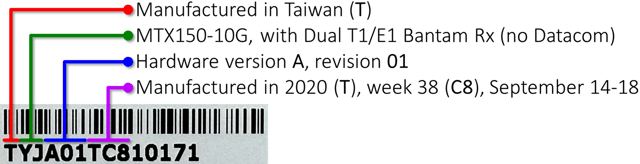
The test set's or module's Serial Number (S/N) contains helpful information about the product's type, version and age. Software release notes (from the product's web page) may refer to the serial number information to indicate compatibility with new features and functions. Most VeEX products use the following serial number structure:
MIDV##YW#12345
- M - Manufacturing facility (e.g., T = Taiwan)
- ID - Unique product type identifier (internal use).
- V## - Test set's or test module's main hardware (board) version (V) and revision (##). (e.g., A01 indicates hardware version A revision 1).
- YW# - Manufacturing date code, Year (Y) and Week number (W#).
- 12345 - Sequential serial number identification.
Year of Manufacture (Y)
The 7th character indicates the year in which the product was manufactured.
F - 2006
G - 2007
H - 2008
I - 2009
J - 2010
K - 2011
L - 2012
M - 2013
N - 2014
O - 2015
P - 2016
Q - 2017
R - 2018
S - 2019
T - 2020
U - 2021
V - 2022
W - 2023
X - 2024
Y - 2025
Z - 2026
A - 2027
B - 2028
C - 2029
0 - 2030
1 - 2031
¦
8 - 2038
9 - 2039
In general, the formula for the year is: 2000 + Letter Sequence Number. With F being the 6th letter in the English alphabet, then it represents the year 2006.
Week of Manufacture (W#)
The 8th letter and 9th digit represent the week number.
O - 0
A - 1
B - 2
C - 3
D - 4
E - 5
For example, O1 represents the first week of the year and E2 represents week 52.
Decoding Serial Number Example
Warranty: If you are checking the manufacturing date because you are considering purchasing a pre-owned VeEX test set, please be aware that in some cases the products' warranty or support may not be transferable. This is particularly true for instruments acquired outside our network of authorized Sales, Support and Service partners, including gray or black-market channels.
Purchases made through our authorized partners ensure that pre-owned test sets offered for sale have not been reported as lost, stolen, or damaged.
Warranty Status: If you are also interested in the current warranty status of a VeEX test set, refer to the How to Check the Warranty Status of VeEX Instruments article. The >Support >Warranty page will also provide the original shipment date.