
Available worldwide, (Easy) EZ‑Remote™ is a secure cloud-based Remote Access and Control solution that allows users to view and fully operate certain VeEX field test sets remotely through a web browser client interface. It is ideal for remote troubleshooting, demonstrations, training, mentoring, support and collaboration.
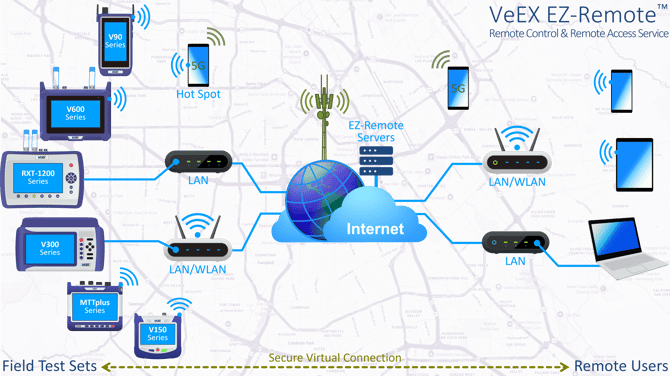
Introduced by VeEX Inc. in the early 2000s, the EZ-Remote cloud service was developed to deliver remote technical support, guidance and training to customers worldwide—without requiring opening special TCP ports, firewall exceptions, or complex IT configurations. EZ-Remote enables establishing a remote connection to the test set at a moment’s notice, from virtually any location. Recognizing the wide range of user experience levels and potential language barriers, a key design objective was simplicity: no registration, no sign-in, no personal data, no license fees, no subscriptions, and no use fees. All you need is a standard web browser and internet access to be able to securely control and access a remote test set and operate it as if you were in front of it.
EZ‑Remote provides screen mirroring and remote control of VeEX instruments (similar to a VNC session). The system transmits the instrument's native graphical user interface (GUI) to a remote user and inputs back to the test set. It also provides remote access to information stored in the test set.
- Remote Control - Let remote users operate test sets from a remote location, as if they were in front of the instrument, using a standard web browser from a PC, tablet or smartphone, via an internet connection. No app, installation or settings required. Both local and remote users can operate, navigate and see what the test set is displaying on its screen.
- Remote Access - Allows remote users to access, view, manage and download test results, test profiles and screenshots. Once connected to the instrument, remote users can View, Download, Delete, generate PDF, Search and Filter, directly on the test set from the remote PC/Table/Phone. (The remote software update function is not available in EZ-Remote mode.)
The remote sessions are considered secure and each use isolated VPN tunneling. Due to heightened cybersecurity concerns, the service could still be blocked by stronger IT policies at highly secure locations.
Typical use cases
-
Remote troubleshooting and support.
-
FAE support, evaluations, demos and customer trainings.
-
Mentoring, expert remote analysis and diagnostics.
-
Lab-to-field, NOC-to-field and peer-to-peer collaboration.
-
Temporary testing or monitoring at (unmanned) point-of-presence (PoP).
-
Leaving instruments behind at customers' premises for ongoing testing and diagnostics (e.g., chasing intermittent service issues).
-
Access to test sets without direct IP reachability.
-
Enable a technician to perform two-person end-to-end job workflows, without having to drive back-and-forth between the two ends of the link under test.
- Using EZ‑Remote, VeEX Customer Care team may remotely evaluate whether the test equipment needs to be returned to a service center for repair or if the reported issue can be resolved locally, helping reduce both downtime and costs.
How does it work?
Once the test set is connected to the internet, it can initiate an EZ‑Remote session (accessible from the EZ‑Remote app in the test set’s System Utilities menu). After the session is established, the test set is in its own virtual private network (VPN). The local technician can then share the login information with colleagues, allowing them to access the instrument remotely. Once the information has been shared, the AC/DC charger can be plugged into the test set and be left unattended.
Remote users can join an EZ‑Remote session by opening a web browser, navigating to ezremote.veexinc.net, and entering the test set’s serial number (session ID) and password. For even faster access, the technician in front of the test set can scan the QR codes displayed on the screen and send a dedicated link via text/SMS or email.
Because the EZ‑Remote client is web‑based, it is platform independent, giving remote users the flexibility to connect from a PC or laptop (Windows, macOS, Linux), tablet (Android, iPadOS), or smartphone (Android, iOS).
Works over the Internet
Remote users and test sets require internet access to connect to access the EZ‑Remote service. This can be done via:
-
LAN/Ethernet
-
WLAN/Wi‑Fi
-
Cellular 4G/5G (directly from Laptops, tablets or smartphones)
-
Cellular tethering (e.g., wired or phone hotspot)
Terms and Conditions
Test sets supporting EZ-Remote
VeEX continues to expand EZ-Remote support across new field test platforms and product families. The following is a partial list of supported product families:
 MTTplus modular test platform (e.g., MTTplus-410+ OTDR, MTTplus-340 2x10G, etc.)
 RXT-1200 and RXT-1202 advanced modular test platforms (e.g., RXT-4113+ OTDR, RXT-3400 2x10G, RXT-6200 2x100G, RXT-6402 2x400G, RXT-6802 2x800G, etc.)
 V90 handheld series (e.g., FX92 DWDM, MTX90 Internet, PX90 PON, PX92 PON, etc.)
 V150 series (e.g., MTX150-10G Transport, MTX150x Ethernet, CX310 HFC, FX150+ OTDR, FX120 PON, FX160 Bidirectional OTDR, etc.)
 V300 series (e.g., CX380C HFC, TX300s-100GX, TX340s-100GX, TX340s 2x10G, etc.)
 V600 series (e.g., MTX642 2x400G, MTX640 2x100G+400G multi-service test sets, etc.)