
1. Line vs. Frame vs. Data Rates - Key Differences
2.1 Line Rate
Line rate is the total number of bits sent across the medium in one second. It includes everything sent over the wire or fiber: User Data (Payload), All Protocol Headers (MAC, IP, TCP, etc.), plus Layer 1 Overhead (Preamble, Start of the Frame Delimiter, Encoding Bits, Error Correction). Line rate represents the maximum raw capacity of the link at the physical layer.

Figure 1. Basic Overall Ethernet Frame Format
2.2 Frame Rate
Frame rate is the size of the full Ethernet/IP frame without the physical layer overhead. It includes User Data (Payload) + All Headers (MAC, IP, TCP etc.). This is the compete frame that is transmitted over Ethernet before Layer 1 overhead is added.
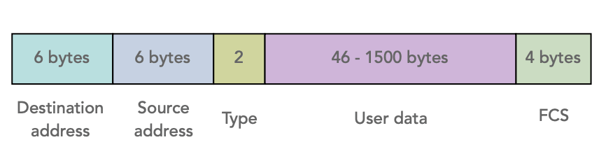
Figure 2. Basic Ethernet Layer 2 Frame Format
-
Definition: The number of Ethernet frames transmitted (or received) per second.
-
For end-to-end testing purposes, the frame is often set to a constant value (length) and rate to accommodate a constant stream of data bits (test sequence or pattern).
-
In live monitoring scenarios, both frame sizes and rates are variable.
-
-
Calculation:
Frame Rate = Line Rate (bps) / Total Frame Size (bits)-
Includes all overhead: preamble, inter-frame gap (IFG), MAC headers, CRC, etc.
-
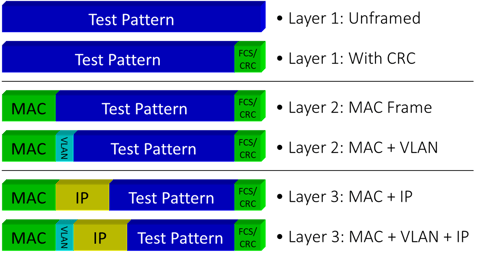
The number of overhead bits depend on the type of link under test (e.g., Layer 2, Layer 3, VLAN, etc.)
-
Frame sizes can vary from 64 to 1518 bytes, or even larger (jumbo frames).
-
- Impact:
-
Smaller frames result in higher frame rates but lower efficiency due to relatively larger and more frequent overhead.
-
Larger frames reduce frame rate but improve bandwidth utilization.
-
2.3 Data Rate
Data rate includes only the User Data bytes (Payload). It does not include protocol headers or physical overhead. This reflects the effective throughput available to applications. Data rate is always lower than liner rate because part of the link is used for headers and control information.
-
Definition: The actual payload throughput — how much user data is transmitted (or received) per second.
-
For end-to-end and out-of-service tests, the maximum data rate depends on the Ethernet layer under test and selected frame size.
-
Calculation:
Data Rate = Frame Rate × Payload Size (bits)- Excludes Ethernet overhead.
- Reflects usable bandwidth for applications.
-
Impact: Data rate id more relevant for assessing application performance and service delivery. It’s what users experience as “speed.”
3. How VeEX Test Sets Handle These Metrics
3.1 Frame Rate Measurement
-
VeEX test sets like the MTX150, MTX150x, TX340s, MTTplus-340 and RXT series calculate frame rate based on the selected frame size and line rate.
-
They factor in Ethernet overhead (e.g., 160 bits per frame) and inter-frame gap (96 bits)
-
Efficiency improves with larger frame sizes — e.g., 64-byte frames lose ~23% bandwidth to overhead, while 1518-byte frames lose only ~1.3%.
-
Example: For 64-byte frames (512 bits), the typical Ethernet overhead is 160 bits, resulting in ~1,488,095 frames/sec on a gigabit link.
3.2 Data Rate Measurement
-
Often used in Throughput, RFC2544, Y.1564 (V-SAM), RFC6349 (V-PERF, iPerf) and speed tests (V-TEST, Ookla Speedtest).
-
VeEX test sets allow configuration of custom data rates per frame size or use maximum line rate.
-
Data rate is reported in Mbps or Gbps, and reflects actual throughput excluding overhead.
3.3 Why It Matters
-
Line Rate helps confirm that the physical link is configured correctly.
-
Frame Rate is critical for understanding network load and packet processing.
-
Data Rate is essential for evaluating service performance and user experience.
-
VeEX test sets provide both to give a full picture of Ethernet link behavior.
4. What About Speed Test Measurements? What Rates are Those?
Tests like V-TEST (VeEX, powered by Ookla®), Speedtest® (Ookla), Fast.com (Netflix) and speed.cloudflare.com (CloudFlare) measure the effective internet TCP/UDP Data Rate available to users' applications. The results reflect only the layer 4+ User Data that is successfully transferred between the client device and the test server. They are not meant to validate or troubleshoot point-to-point Ethernet connectivity or performance, but to confirm Internet access services' top throughput ("speeds").
Ookla Speedtest uses multiple TCP streams between a client and a nearby server to saturate the link for a short period of time. The reported values represent the real data transfer speeds that user experience, including the effect of retransmissions, congestion control and routing, rather than the theoretical maximum capacity of the link.