
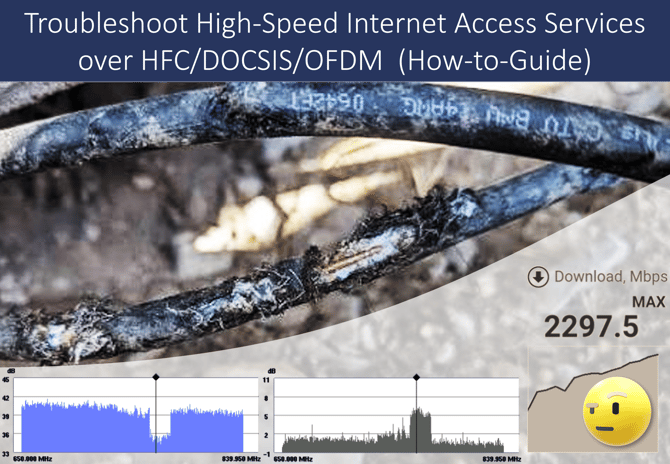
Speed tests measure actual upstream and downstream data throughput, at the customers' access interface (WAN) or demarcation point, and can confirm whether a multi-gigabit internet access service is delivering its advertised performance. While this makes speed testing an important validation tool, it should not be treated as a diagnostic or troubleshooting method. The speed test results can reveal the symptom (e.g., data throughput below expectations, excessive latency), but not the underlying problem, root cause, or required corrective actions. Meaningful insights come from combining speed test results with DOCSIS 3.1 OFDM diagnostics.
This article presents diagnostic tools and practical techniques for troubleshooting high-speed internet access services over HFC networks using DOCSIS 3.1 and OFDM.
Troubleshooting DOCSIS 3.1 OFDM Issues
By monitoring OFDM lock status, modulation profiles, MER, codeword utilization, and Uncorrectable Codeword Errors (U-CWEs), technicians can identify RF impairments that may degrade customer internet performance. When further analysis is required, a subcarrier scan provides detailed power, MER, and noise-floor measurements across the OFDM channel, helping pinpoint the affected frequency range. The following workflow provides a practical approach for identifying impairments, validating repairs, and restoring full DOCSIS 3.1 broadband performance.
Step 1: Verify the OFDM Health
Before beginning deeper troubleshooting, confirm that the OFDM channel is operating normally. Key items to verify:
- PLC and NCP are locked
- Profile A is active
- MER values are stable
- Signal levels are within specification
- No significant Uncorrectable Codeword Errors are present
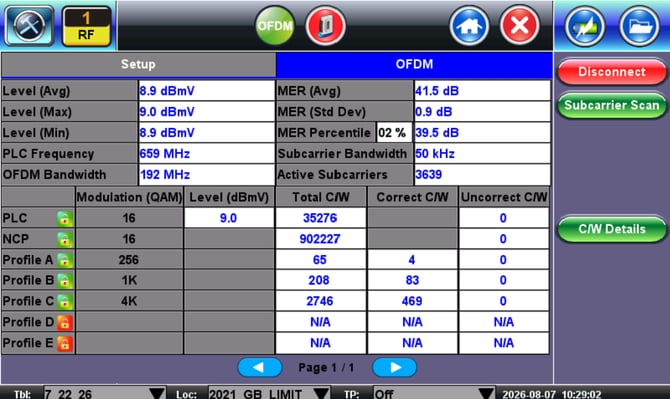
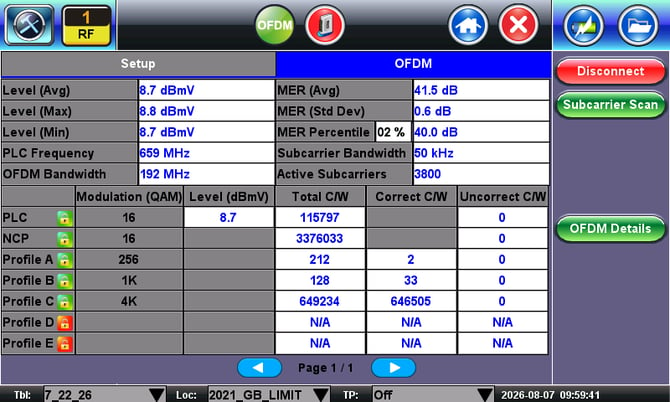
A healthy OFDM channel typically shows most traffic flowing through the highest modulation profile (4K-QAM), indicating maximum network efficiency. The OFDM channel below shows strong MER, stable levels, and active high-order modulation profiles.
Step 2: Monitor OFDM Performance During Traffic
Run a speed test while simultaneously observing OFDM statistics. During periods of heavy traffic, watch for:
- Rising uncorrected codeword errors (U-CWE)
- MER degradation
- QAM modulation profile shifts
- Loss of Profile A lock
- Increased use of lower-order modulation profiles
These indicators often reveal RF impairments that may not be obvious from speed test results alone.
Example Problem: Reduced Throughput
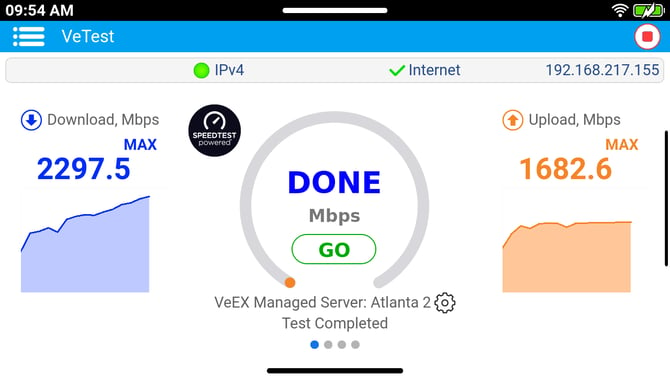
The following speed test results example is from a 3 Gbps (download) service, in which the results showed only <2.3 Gbps. So, all we know so far is that there is a problem.
Going into the DOCSIS test features and looking at the OFDM statistics, it shows the codeword counters shifting into lower 1K QAM modulation profile (Profile B), rather than staying at the maximum 4K (Profile C).
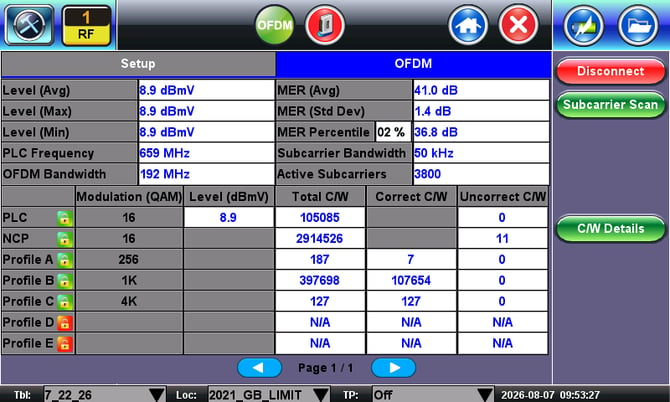
 Technician Tip: If codewords shift away from the highest modulation profile, check for noise, ingress, or interference that could be degrading OFDM performance.
Step 3: Run a Subcarrier Scan
When OFDM measurements indicate a problem, perform a Subcarrier Scan, which measures:
- Power distribution
- MER by frequency
- Noise floor characteristics
- Localized impairments
Unlike average channel measurements, the Subcarrier Scan can reveal specific frequencies impacted by interference or HFC plant issues.
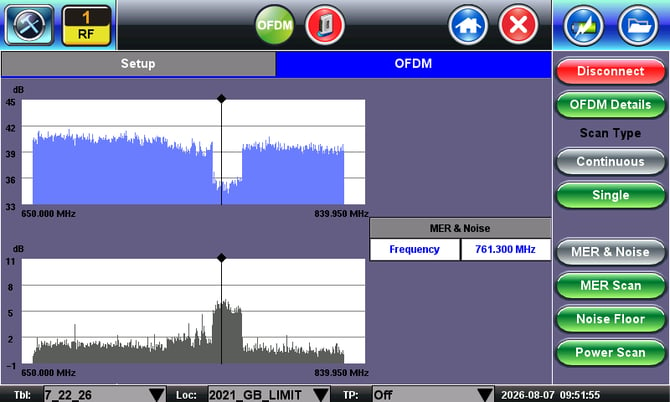
Example: Impairment Detected Near 761 MHz
The scan showed a clear impairment concentrated within a specific frequency range. A localized issue like this would be difficult to identify by only using average channel measurements.
Step 4: Determine the Root Cause
Once an impairment is identified, analyze its signature:
| Measurement Observations | Possible Causes |
| Elevated noise floor | Ingress or damaged coaxial cable |
| Sharp noise spikes | LTE or external RF interference |
| Localized MER degradation | Plant impairment or damaged passive |
| Large MER hump or valley | Reflection or standing wave |
| Uneven power levels | Balancing or level alignment issues |
Apply a divide-and-conquer segmentation approach to quickly narrow down the affected network section and isolate the fault.
Step 5: Locate and Repair the Fault
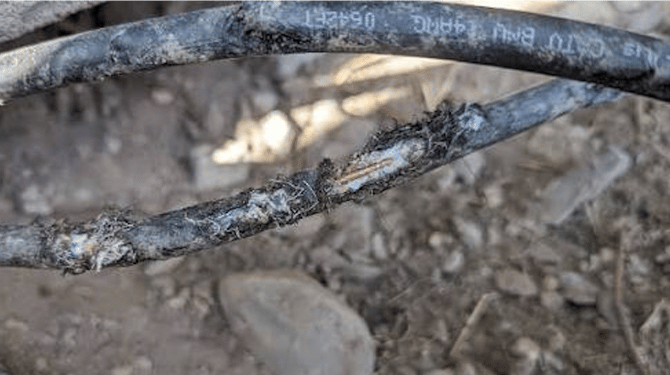
In this example, a field inspection revealed a damaged drop cable (coaxial).
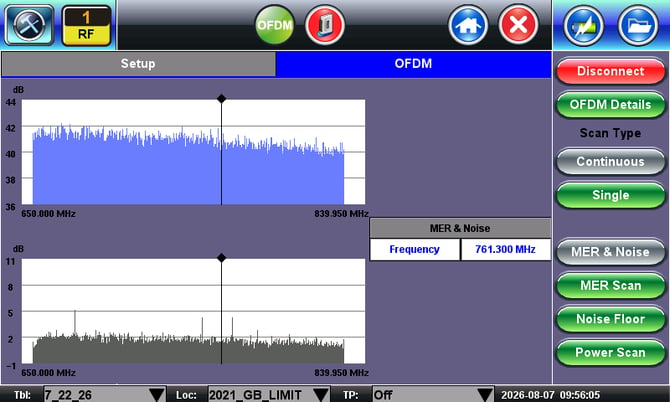
After replacing the drop cable, the Subcarrier Scan returned to the expected normal.
Step 6: Validate the Repair & Restore the Service
- Run another speed test to verify the download and upload throughput rates
- Verify the OFDM channel is utilizing the highest modulation profile
- Confirm MER remains stable
- Verify that codeword errors remain low
- Perform a final Subcarrier Scan.
Performance Restored
The repaired network drop achieved the required 3 Gbps download rate.
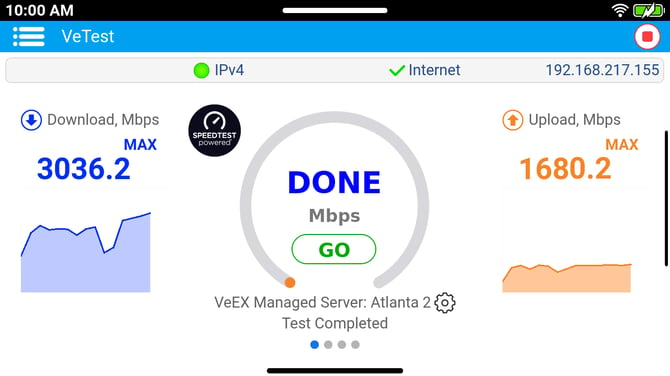
We can clearly see in the OFDM results that the Codewords have shifted back to the highest 4K modulation profile, indicating the OFDM channel is again operating efficiently.
Key Takeaway: The combination of OFDM Analysis and Subcarrier Scan is a powerful set of diagnostic tools that help CATV/HFC technicians understand why broadband performance has degraded and where to focus their troubleshooting efforts.
Note: VeEX's OFDM Analysis does not require its cable modem to achieve lock, significantly reducing the time needed to measure OFDM channel performance. (However, if you are using instruments from other test-and-measurement vendors, their modem may need to achieve lock before measurements can begin, which would take much longer, provided that the impairment still allows it to lock.)