
When a TX340S test set, fitted with Bantam PRI test interfaces and set to DSn Dual Port Monitor test mode, the TX bantam port is temporarily converted into a Secondary RX input (a.k.a. RX2). So, in Dual Port Monitor mode, both bantam ports are receivers (RX = "RX1" and TX = "RX2"). Both inputs share the same T1/DS1 configuration.
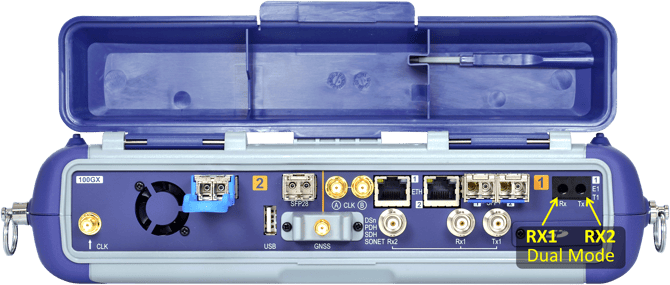
These two receiver ports are often connected to the protected monitoring points (PMP) on line cards or panel, to monitor both directions of a live link, according to ITU-T G.772 to avoid disturbing the traffic. In such cases, the test set's Termination must be set to Monitor, to compensate for total attenuation around 20 to 26 dB.
The Dual Port DSn Monitor feature may not be available on all test sets. Check the latest test platform and module software release versions.
Test sets fitted with the RJ48 balanced E1/T1 port option, use the RJ48M dual pinout capabilities for bidirectional monitoring, with RX1 on pins 1,2 and RX2 on pins 7 and 8.
Related Test Solutions
-
TX340S - Advanced 10G Multi-Service Test Set
-
TX340S-100GX - Advanced 100G Multi-Service Test Set
-
RXT-3400 - Advanced 10G Multi-Service Test Module
- MTTplus-340 - 10G Multi-Service Test Module