
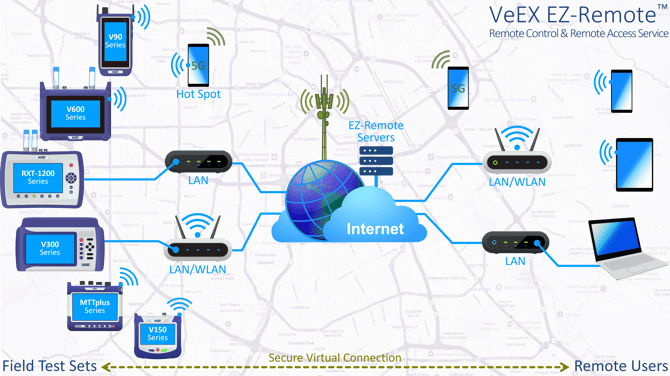
EZ-Remote™ allows remote users to securely access and fully control supported test sets across different networks and locations worldwide through GUI, mouse, and keyboard mirroring, using any standard computer, tablet, or phone's web browser as the client.
Table of Contents
-
In addition to the standard free service, does VeEX offer any additional paid option with SLA?
-
Can EZ-Remote traverse common firewalls without the need for opening extra TCP ports?
-
Is EZ-Remote considered cyber secure?
-
Does EZ-Remote collect and/or store users' information and/or data?
- Related remote control & remote access articles - Knowledge Base
How to order the EZ-Remote feature or option?
The built-in EZ-Remote™ service functionality comes pre-installed in supporting VeEX test sets. No additional orderable item is required during the purchase of the equipment. Individual users do have the choice of disabling the remote access functionality, if required.
This cloud service and the remote client functionality are currently available at no cost, and accessible through any standard web browser (https://ezremote.veexinc.net).
In addition to the standard free service, does VeEX offer any additional paid option with SLA?
At this time, VeEX does not offer any paid, tiered, or premium EZ-Remote subscription plans with guaranteed performance or service level agrements. Please refer to the EZ-Remote Terms and Conditions for more details.
Since its introduction, EZ-Remote has demonstrated tier-1 level performance and uptime, with high availability, reliable service performance, short response and resolution times, and negligible downtime to date.
Can EZ-Remote traverse common firewalls without the need for opening extra TCP ports?
Yes, EZ-Remote's VPN can traverse common firewalls, because it is highly adaptable, and uses specific protocols to avoid being blocked. However, its success depends on the firewall's strictness and local network's cybersecurity policies at both ends.
While the use of common TCP port 443 helps EZ-Remote's VPN pass through most firewalls, highly advanced firewalls (like deep packet inspection tools or those used in heavily restricted sites or countries, like China) may still block it. VeEX also has EZ-Remote session servers hosted in China to help with connectivity within the region.
In certain cases, (if allowed) the use of wireless or wired cellular tethering at either end, could help provide short-term connectivity within highly restricted network environments.
Is EZ-Remote considered cyber secure?
Cybersecurity, data protection, and privacy remain core considerations for VeEX cloud services. VeEX continuously monitors its cloud infrastructure and SaaS applications for potential threats and vulnerabilities to improve service resilience and implement the appropriate preventive and corrective actions.
-
EZ-Remote uses a VPN-based architecture to establish an isolated, end-to-end connection between the remote user’s web client and the test set.
-
The test set uses its own internal hardware identification (serial number) as credentials to create the remote session, so no personal user information is required, collected, or stored, and no user registration is necessary.
-
The remote test set provides limited access, restricted to screen mirroring and selected information contained in the Users storage partition only (e.g., measurement results, test profiles, screenshots and diagnostic logs).
The EZ-Remote cloud service relies on OpenVPN, a widely adopted virtual private network framework, and uses established encryption methods such as AES-256 and ChaCha20, together with SSL/TLS-based key exchange mechanisms, to secure communications. Because OpenVPN is open source, its code base is broadly reviewed by the security community, which helps identify and address vulnerabilities as they are discovered.
That said, no connected software service should be considered infallible. As with any widely deployed software platform, security issues may occasionally emerge. VeEX therefore continues to monitor CVEs and relevant industry reports so that patches, mitigations, and other remediation measures can be applied in a timely matter, as needed.
EZ-Remote is intended for temporary remote access when needed, not as a long-term, always-on test set access, control or monitoring solution. For cybersecurity reasons, never connect a test set, or any other device, directly to a public IP address.
Refer to Cybersecurity Recommendations for Test Equipment Permanently or Temporarily Connected to IP Networks for further information.
Can EZ-Remote support multiple remote users?
Technically yes, multiple remote users could connect to one test set to view and/or control it. However it is not recommended. Additional concurrent users increase the processing load on the test set’s CPU and may stress limited internet connections, which can degrade responsiveness and overall user experience.
Since EZ‑Remote uses VNC-style screen mirroring, all remote users share the same interface (GUI) view and control, which can lead to conflicting inputs (sometimes referred to as a “mouse fight”).
If multiple remote users need to connect to the same test set for training, coaching, mentoring, or field troubleshooting, make sure all participants understand the potential limitations. If available, passive users (viewers) should use the "VNC Regular User Password" so they can view the session without controlling the user interface or interfering with active operation.
Does EZ-Remote collect and/or store users' information and/or data?
No. EZ-Remote is a secure, peer-to-peer, end-to-end encrypted tunneling service that does not access, sniff, collect, or store users’ information or data. There is no sign-in, login, registration, or subscription process, and the service does not identify, track, or monitor who the end users are, what activities they perform, or what data is transferred between the ends.
The only information EZ-Remote receives, directly from the test set, is the device serial number and the password assigned when a session is initiated. EZ-Remote does not store, retain, or pre-populate this information for any future sessions.
Please refer to the EZ-Remote Terms and Conditions and Privacy Policy for more details.
Will VeEX or its cloud provider properly erase all user-related data, including backups, after the EZ-Remote service is terminated?
There is nothing to erase after the private session ends. EZ-Remote is a secure, peer-to-peer, end-to-end encrypted tunneling service that does not access, sniff, collect, or store users’ data. It does not identify or monitor who the end users are, what data is exchanged, or what activities they perform.
The EZ-Remote service is provided on a session-by-session basis. There are no explicit or implicit long-term service agreements.
Please refer to the EZ-Remote Terms and Conditions and Privacy Policy for more details.
(How) Does VeEX notify customers and/or end users about regular maintenance windows, upgrades, and service or server outages?
EZ-Remote is a best-effort service provided free of charge, on an as-is and as-available basis, with no service contract or agreement. Customers are responsible for making their own informed decision about whether to use the service for mission-critical applications. Users can also disable it entirely on the test set by turning off the VPN Services settings.
VeEX cannot notify individual EZ-Remote customers or end users because no contact information is collected. EZ-Remote operates only between known test sets (devices) and the session servers, and does not collect end user identifiable information (no names, no email addresses, no registration, and no sign-in of any kind). However, for major server upgrades, VeEX may send a general maintenance window notification to all registered users.
Since its introduction, the EZ-Remote service has demonstrated high robustness and high availability, with negligible downtime, including during planned maintenance and upgrades. Before applying software updates to any of the available session management servers, our team checks for any active sessions to define a time windoe that minimizes interruptions to end users.
Alternatively, in the event of an EZ-Remote server outage, or based on their own security policies and restrictions, customers and end users may choose to use their own vetted VPN services to connect to the remote LAN/WLAN to which the test set is connected to, then enter the remote test sets’ IP addresses on a web browser or commercially available VNC clients, to monitor and control a remote test sets.
Does VeEX have a method of compensation for EZ-Remote service interruptions, data leaks, loss, or damage due to negligence on the part of the cloud service provider?
There is no compensation policy for this best-effort, as-is, as-available service, which is optional for customers to use and does not hinder, limit, or is required for any of the test sets’ advertised core functionalities.
Alternatively, in the event of an EZ-Remote server outage, or based on their own security policies and restrictions, customers and end users may choose to use their own vetted VPN services to connect to remote test sets’ IP addresses using a web browser or standard VNC clients.
The EZ-Remote service does not collect any end user information or data. Please refer to the EZ-Remote Terms and Conditions for more details.
Does EZ-Remote offer support for third-party authentication, such as single sign-on (SSO), OpenID Connect or SAML?
No. They are not considered necessary at this time. EZ-Remote provides isolated, encrypted, peer-to-peer tunneled communication between an independent field test set (device) and a remote user (browser). Given that the primary users are field test sets and field technicians, it could create more risks than security benefits. Extending access to an organization’s internal SSO infrastructure would introduce additional exposure without significant benefit. In addition, a customer’s preferred identity provider (IdP) may not be uniformly available worldwide.
Can EZ-Remote's Session ID and Password be changed?
Fix Session ID
For security reasons, the Session ID is directly associated to the individual hardware (test set), assigned and registered during manufacturing and validated by the session servers, so it can't be changed by users. The session ID will only be valid while the internet-connected test set has an active EZ-Remote session.
Changing Password (Recommended)
To change the default or update the Password, follow the steps below to go to the System Utilities menu and change the VNC Super User Password. It is highly recommended to change the default password!
-
 MTTplus series - Tap on the System Tools icon and go to >Utilities >Settings >More >Remote Access.
 -
 RXT-1200 series - Tap on the System Tools icon and go to >Utilities >Settings >More >Remote Access.
 -
 V90 series - Swipe down from the top to reveal the System Tools menu and tap on the global Settings button. Note: At the moment, the password can't be changed.
 -
 V150 series - Tap on the System Tools icon, select the LAN & Connectivity tab and tap the Set Remote Access button.
 -
 V300 series - Tap on the System Tools icon and go to >Utilities >Settings >More >Remote Access.
 -
 V600 series - Swipe down from the top to reveal the System Tools menu and tap on the global Settings button.
To disable the EZ-Remote and Web Remote Access services, go to the Remote Access or global Settings menu and set VNC Service to Disable.
Which VeEX test sets support EZ-Remote?
VeEX continues to expand EZ-Remote support across new field test platforms and product families. The following is a partial list of supported products:
-
MTTplus modular test platform (e.g., MTTplus-410+ OTDR, MTTplus-340 2x10G, etc.)
-
RXT-1200 and RXT-1202 advanced modular test platforms (e.g., RXT-4113+ OTDR, RXT-3400 2x10G, RXT-6200 2x100G, RXT-6402 2x400G, RXT-6802 2x800G, etc.)
-
V90 handheld series (e.g., FX92 DWDM OCC, FX95 BiDi OLTS, MTX90 Internet QoS/QoE, PX90 PON, PX92-series PON, etc.)
-
V150 series (e.g., MTX150-10G Transport, MTX150x Ethernet, CX310 HFC, FX150+ OTDR, FX120 PON, FX160 Bidirectional OTDR, etc.)
-
V300 series (e.g., CX380C HFC, TX300s-100GX, TX340s-100GX, TX340s 2x10G, etc.)
-
V600 series (e.g., MTX642 2x400G, MTX640 2x100G+400G multi-service test sets, etc.)